How to Get a Wind Alert for Your Kite Spot That Only Fires on Good Days
Why “wind above 15 knots” alarms fail riders, what makes a day worth the drive, and how to set up a wind alert for your kite spot that fires only when it's on.
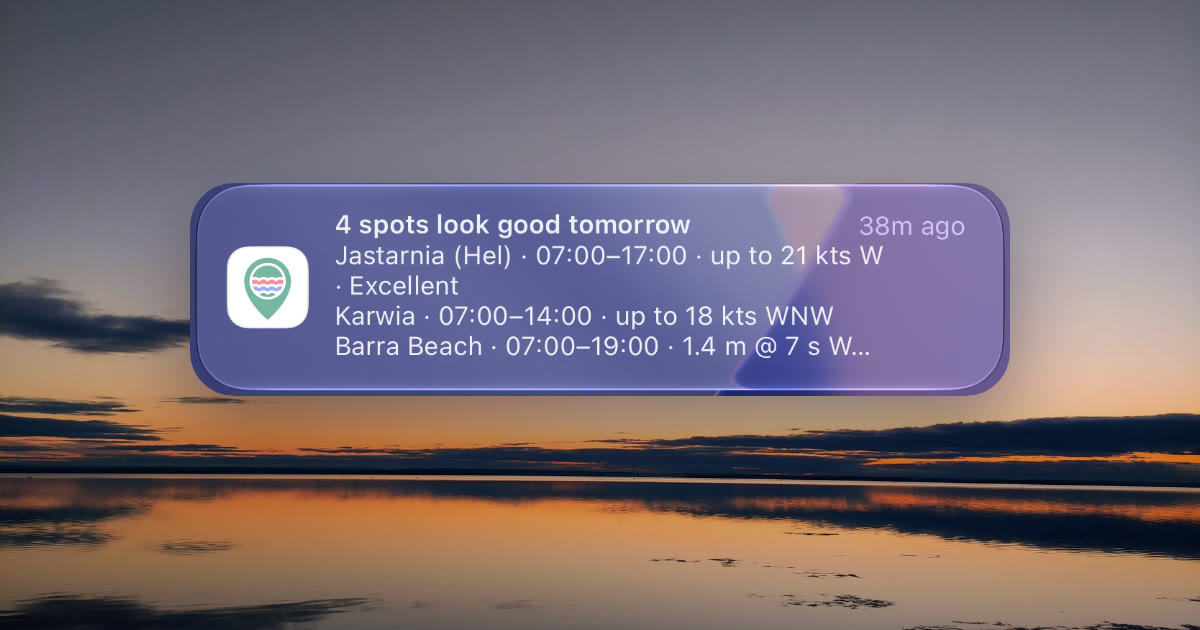
It’s 22:30 on a Tuesday. You have three forecast apps open, your thumb flicking between them, trying to decide whether to set an alarm for the lagoon tomorrow. One says 17 kt at 14:00, one says 13 kt, one says 19 kt gusting 28. Then the alarm app you set up last spring buzzes: “Wind above 15 knots tomorrow.” It buzzed last Thursday too — for a gusty onshore mess that blew out by noon.
A wind alert should answer one question: is tomorrow worth it at my spot? Most of them answer a different one — will a number cross a line? This guide covers why threshold alarms keep crying wolf, what actually makes a day worth the drive, and how to set up an alert for your kite spot that stays quiet until it’s on.
Why “wind above 15 knots” lets you down
A threshold is one number. A session is five or six things lining up at once. An alarm that only watches the average wind misses every one of the others:
- Direction. 18 kt dead offshore at a beach with nothing downwind is not a session — it’s a rescue. 18 kt side-on at the same beach is the day you’ve been waiting for. A threshold can’t tell them apart.
- Gusts. 15 kt gusting 18 is steady. 15 kt gusting 25 is a different sport. The gust factor — gust ÷ average — decides whether you ride or fight, and a threshold ignores it.
- Hours. 20 kt at 04:00 and 9 kt by sunrise looks great on an alarm that watches the whole day. It’s worthless to you.
- Duration. One hour above 15 kt between two lulls is weather, not a session. You want a run of good hours long enough to rig, ride and pack up.
- Tide. On a spot with real tidal range, a perfect wind window that lands on a spring low is a long walk over mud. (More on that in Tides for Kiters.)
Set the threshold low and it fires every other day; set it high and it misses the clean 14 kt sea breeze that would have planed you on a 12 m. Either way you learn to ignore it.
What makes a day worth it
Before any app gets involved, this is the checklist experienced riders run in their heads the evening before:
| Ingredient | Why it matters | What to look for |
|---|---|---|
| Wind strength | Enough to plane on the kite you own, not so much you’re overpowered | Inside your range for your weight and quiver (Kite Size from Forecast) |
| Gust factor | Steady wind is fun, gusty wind is work | Under 1.3 is clean, over 1.5 is unstable |
| Direction | Decides safety and chop at this spot | Side-shore or side-on; never the spot’s no-go direction |
| Hours | You can only ride when you can be there | Inside daylight, or inside the hours you’re free |
| Duration | Rigging for 45 minutes of wind is a bad trade | A run of at least 2 hours |
| Tide | Water level can open or close the launch | Inside the spot’s good tide window, where it has one |
| Model agreement | Three models saying 18 kt is more believable than one | A tight spread across models |
Types of Wind explains why a forecast can hit the number and still deliver junk — a collapsing thermal, an offshore gradient, air spilling off a headland.
How riders handle it today
Most riders handle it with a routine: check two or three apps after dinner, open the hourly view for each home spot, squint at the arrows, check the tide table, then decide. It works — and it costs you 15 minutes every evening, including the four evenings out of five where the answer is “no”.
The routine also breaks when it matters: you’re travelling, you forget, or you check too late to swap a shift.
What you want is the checklist run for you, every evening, against your spots and your preferences — and a message only when the answer is “yes”.
A scored alert instead of a threshold
That’s how alerts work in Wavind. Instead of a single wind number, each hour at your spot already carries a session score in the forecast — built from wind strength, gusts, direction against the spot and, where the spot has a tide rule, the tide, judged against your own sport profile. An alert asks for a level of that score, not a wind speed:
| Choice | An hour counts when |
|---|---|
| In range | It’s inside the spot’s own wind range |
| Ridable | Your forecast would score it ridable or better |
| Good | … good or better (the default) |
| Excellent | … among the best hours your forecast scores |
So an alert means exactly what the colours on your forecast mean. A direction the spot marks as no-go never counts, however hard it blows.
On top of that:
- Your hours, read at the beach. By default the alert uses your forecast hours (daylight unless you changed them). “Daylight” includes a buffer before sunrise and after sunset at the spot — one hour on each side by default. The alert’s own Daylight preset uses that one-hour buffer; following your forecast hours uses the buffer you chose there. 07:00 is 07:00 at the spot, even when you’re in another timezone.
- Sessions, not spikes. A run of good hours has to last at least 2 hours to count (change it under Fine-tune). Sessions are clipped to your hours before that duration check. Fixed windows include the hour selected as their end: with a window of 07:00–19:00, wind from 14:00 to 22:00 is announced as 14:00–20:00.
- Floors if you want them. Fine-tune also takes a minimum wind on top of the score — useful when your biggest kite needs 16 kt to plane.
- Once a day, at most. One briefing about tomorrow, at the time you pick — 18:00 by default, in your own timezone. A day with nothing worth going for sends nothing.
Set it up in three steps
Alerts live in the Wavind app on iPhone and Android:
| Step | iPhone / Android |
|---|---|
| 1 | Tap your picture → Alerts → Turn on alerts |
| 2 | Tap a saved spot → Alert for this spot |
| 3 | Pick Wind, Surf or Both, and how good it has to be (Good by default) |
Want it at a different time? Settings → Notifications, then pick the hour under Alerts.
Before you leave the spot’s alert, scroll to This week. It shows what the alert would have sent with the current forecast — each session with its day, times, wind and level — and updates as you change the settings. If the week is empty, it suggests the next level down (“Try Good”). It’s a guide to your settings, not a promise: the forecast moves.
Reading the briefing
One spot looks like this:
Hel — Bay side looks good tomorrow
Hel — Bay side · 09:00–13:00 · up to 22 kts W · Good
Several spots arrive in one message, one line each:
3 spots look good tomorrow
Hel — Bay side · 09:00–13:00 · up to 22 kts W
Ericeira · 07:00–11:00 · 1.6 m @ 12 s WNW · Good
Chałupy · 11:00–17:00 · up to 19 kts WSW · Excellent
Times are each spot’s local time, in your units. A one-spot briefing opens that spot’s forecast; a multi-spot one opens your saved spots.
Where it matters
- Tarifa, Spain — Levante days are gusty and accelerate through the strait by afternoon. An alert on Good with your profile’s gust limit filters the days that are more fight than ride.
- Hel, Poland — calm Baltic summer days can bring a sea breeze that only some models catch (see Sea Breeze 101). A scored alert on the bay side flags the afternoons worth leaving work for.
- Ericeira, Portugal — a surf alert judges wave height, period and the wind against the shore, so a big swell blown out by onshore wind doesn’t wake you up.
Frequently Asked Questions
Are Wavind alerts free?
Yes, with every option. The free plan covers alerts for one spot; Pro covers every saved spot in the same daily briefing.
Will it spam me?
No. You get at most one notification a day, and none at all when nothing at your spots is worth going for. The same day is never briefed twice.
Can it tell me when it’s windy right now?
No. Wavind briefs you about tomorrow, the evening before, so you can plan the day. It doesn’t send live gust or “wind now” alerts.
Can I get alerts on the website?
No. Alerts are set up in the iPhone or Android app and arrive as phone notifications. Your alert settings belong to your account, so they come back when you sign in on a new phone.
What if the forecast changes after the briefing?
The briefing uses the forecast at the time it’s sent and isn’t re-sent for the same day. Check the spot’s forecast in the morning before you drive.
Can I get an alert for waves instead of wind?
Yes. Choose Surf and the alert judges wave height, period and the wind against the shore. Both sends one alert with a line for each sport that works.
How Wavind helps
A wind number is only as good as the model behind it, and models disagree. Wavind blends several weather models — GFS, ICON, AROME and more — into each hour’s forecast, and the session score you see on that composite forecast is the same one your alert reads. A session qualifies when its hours meet your score level, duration and other alert settings. That composite can qualify even when individual models disagree, so compare the models before deciding to drive.
The feature that does the work here is the session score: wind range, gust limit, direction and tide, scored for your sport profile, hour by hour. Alerts are that score delivered the evening before, so you stop checking five apps at 22:30. See everything alerts can do on the wind alerts page.
Want one message the evening before a good day at your spot? Get Wavind, save the spot and turn on alerts.